
Analysing SQLPackage Export performance from Azure SQL Databases
Spoiler alert: It can be disappointing.
In recent years, I have been noticing an uptick in the number of customers who are looking to move their databases away from their Physical and Virtualised environments and jumping straight into DBaaS. Whilst there is a supersaturation of qualitative discussion about the advantages/disadvantages of PaaS versus private clouds, there is a lot less quantitative reasoning available. Ostensibly the journey to the cloud can lead to an inverted three-generation curse where the third generation who are tasked to re-build from the shortsightedness of the first-generation. In this blog, I will be highlighting a data-driven risk that will be faced by the second and third generation for who end up being responsible for exporting databases out from Azure SQL.
I feel the need to affirm upfront that Azure SQL is a very robust and elastic platform that addresses many of the conundrums faced even in Very Large Databases (VLDB), and thus it may end up being the right choice for the size of your environment. However, many companies want additional archived compliance backups of their databases on agnostic storage away from their primary platform. At the time of writing, the native automated weekly full, daily differential and ten-minute Transaction Log backups for Azure SQL Databases remain within Azure’s isolated geo-redundant storage and there is no API to export them.
The following table is comparison of the Import/Export and the built-in backup and restore capabilities as stated back in 2015 by Microsoft.
| Designed for Disaster Recovery | Support PITR | No operational overhead | Transactional consistent backups | No additional cost | Restore to On-Premises | |
| DB Export | No | No | Export needs to be externally triggered | Required DB copy before backup. | Storage and extra DB cost. | Yes |
| Built-in Backup | Yes | Yes | Yes | Yes | Yes | No |
The DB Export technique sequentially reads and dumps the database into a BACPAC file, which means that it any transactions during the export will result in an inconsistent database. Therefore, you need to increase the cloud storage allocation used by SQL Database by a factor of 2-3 to cater just to cater for the export of the temporary database copy.
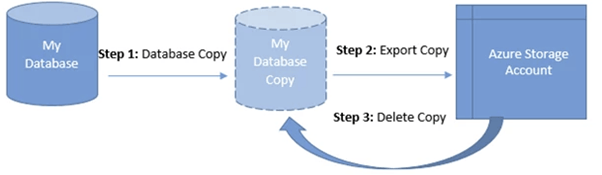
The above example by Microsoft shows how an export of a temporary database copy can be exported directly into an Azure Storage account, but if you want to export databases bigger than 200GB you will need to use SqlPackage, or the DacFx Export API (a .Net wrapper that includes functions used by SqlPackage).
Even though BACPAC SqlPackage/DacFx exporting addresses the 200GB barrier, Microsoft are at least upfront and admirably honest that you will likely experience unresolvable issues if you export VLDB’s. One such consideration of concern is that “if the export operation exceeds 20 hours, it might be canceled (sic)”. The SqlPackage export utility does come with some tuning capability (MaxParallelism, CompressionOption, VerifyExtraction) but I did not see any noticeable experimental performance improvements with my sample 10GB database. What absolutely made a difference is increasing the DBaaS compute. Originally my sample 10GB database was taking a half an hour to export, but after increasing the vCore count from 2 to 8 cores reduced the export speed to just 2.5 minutes.
Furthermore, after I enabled the /Diagnostics switch and I noticed something very interesting when I parsed out the text lines that contained the start and end times for the 503 tables into an Excel stacked bar chart.

It appears that the underlying export algorithm for SqlPackage uses a simplistic nested loop to export 100 tables in a batch as the next batch of 100 tables does not start until the previous slowest table in the previous batch of 100 tables has completed. Now I thought every up-and-coming programmer was taught when it is appropriate to choose a Nested Loop algorithm as the most effective for data processing and obviously this is not one of them. Hopefully one day Microsoft will revise this lackadaisical algorithm decision so that there always 100 tables actively exporting.
In summary, I feel that the additional compute and storage requirements, the programming inefficiencies built into the SqlPackage, and the time pressure to complete in 20 hours is a hidden cloud risk to anyone considering migrating their VLDB’s that have a periodic compliance requirement. Third-Party backup vendors like Commvault can help with the complexities of creating secure automated backups, but they cannot circumvent the fundamental performance shortcomings that only Microsoft can address.